
Description
Site Visitors
Visitor management for your clients’ sites, gates and plants
Invite • Approve • Check in • Comply • Badge • Muster • Report
Community & Enterprise
Odoo.sh & On-Premise
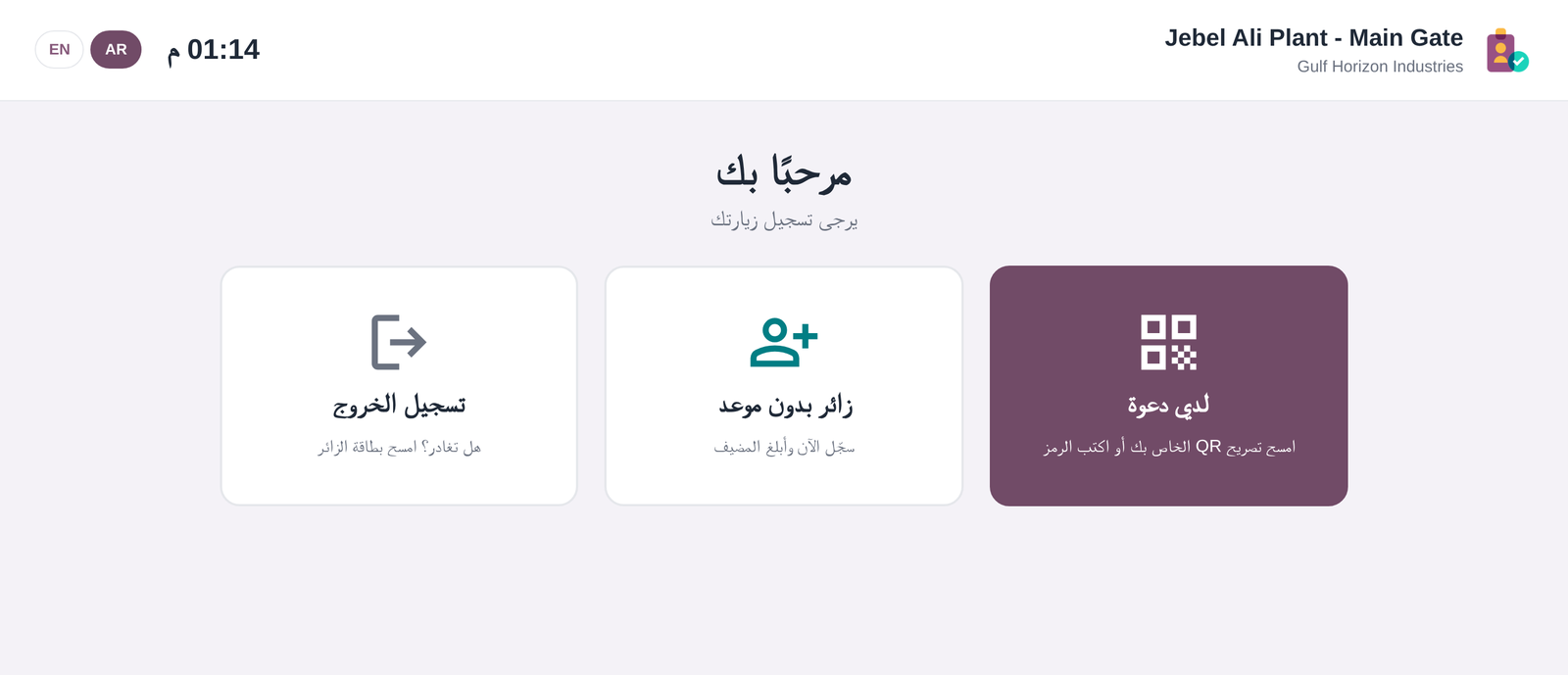
English & Arabic (RTL)
No extra Python libraries
The problem
Facility management, security and service companies receive visitors on behalf of their clients:
contractors, suppliers, auditors and candidates arriving at plants, offices and gates. Paper logbooks and spreadsheets
don’t tell the host that a visitor has arrived. They don’t record who signed the site rules, and they can’t answer the
most important question during an emergency: who is on site right now?
The solution
Site Visitors runs the whole visit inside Odoo, for as many clients and sites as you manage:
invitation with a QR pass, host approval by e-mail or portal, self check-in on a kiosk or at the security desk,
NDA signature, safety induction and PPE checks, watchlist screening, visitor badges, overstay alerts and a live
evacuation roll call. All of it is in English and Arabic.
Key features
Everything a reception and security team needs, configured per client site
🏢 Multi-client, multi-site
One record per client location, with its own hosts, approvers, security staff, supervisor, rules, timezone, badge colour and kiosk. Multi-company record rules are included.
📩 Invitation & QR pass
Visitors receive an e-mail with a QR code, an 8-character pass code, arrival instructions and a link to their online pass, where they can sign the site rules before arriving.
✅ Host approval
Approval can be required per site or per visit purpose. Hosts approve with one click from the e-mail, with no login needed, or from the client portal. The decision is applied only when a button is clicked, so e-mail virus scanners that open links can’t approve a visit by accident.
📱 Self-service kiosk
A touch screen for every site gate: QR scan (camera or USB scanner), walk-in registration, photo, ID, signature, induction, PPE and check-out. Walk-ins waiting for approval are checked in automatically once the host approves.
🛡 Compliance gate
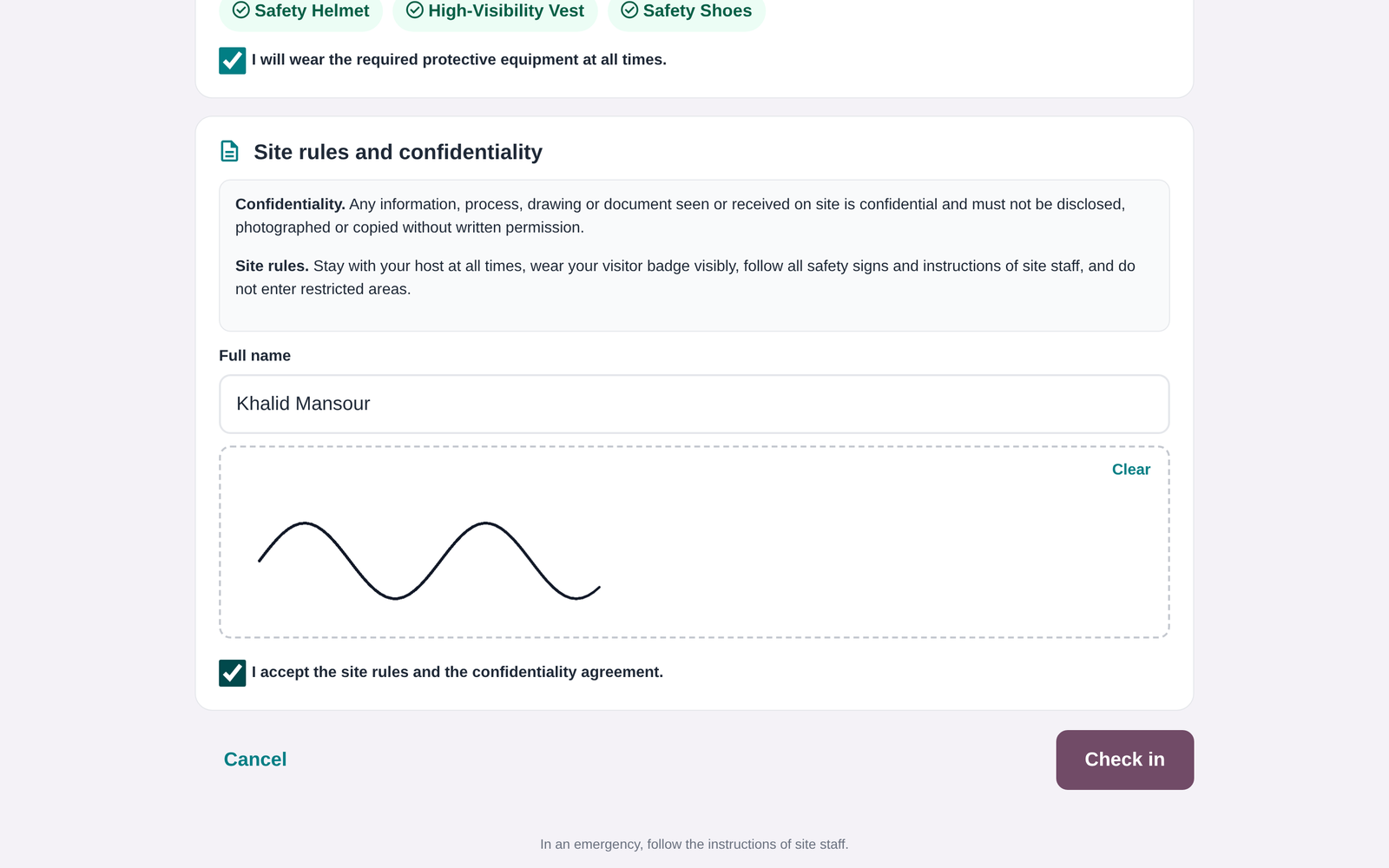
Each site can require a photo, ID number and expiry, an NDA / site rules signature, a safety induction (text and video) and protective equipment. Check-in is refused until every requirement is met, and the form shows what is missing.
🚫 Watchlist
Block people by ID number, e-mail or phone, on all sites or selected ones. A match refuses check-in and alerts the site security supervisor with a message and an activity.
🔖 Badges & vehicles
Card-size badges (CR80) with photo, host, date, vehicle and QR code, in the site’s colour. Record vehicle plate, type and parking slot, plus a physical badge number with a “returned” check.
🚨 Evacuation roll call
See who is on site right now. Tick each person as accounted for at the assembly point, follow a live counter on the site card and print the muster list. The Start Evacuation button also alerts the security team.
⏰ Automation
Every 15 minutes, a scheduled job flags visitors who overstay and alerts the supervisor, marks no-shows and, optionally, checks visitors out at midnight. The host is notified when their visitor arrives.
See it in action
All screenshots come from the app itself, with demo data
1. Visitor Desk: every site at a glance
One card per client site shows who is expected today, who is on site and what is waiting for approval. A single click opens the list, the roll call or the site’s kiosk.

2. Self-service kiosk at the gate
Open the site’s private kiosk URL on a tablet. Invited visitors scan their QR pass, walk-ins register themselves, and leaving visitors scan again to check out.
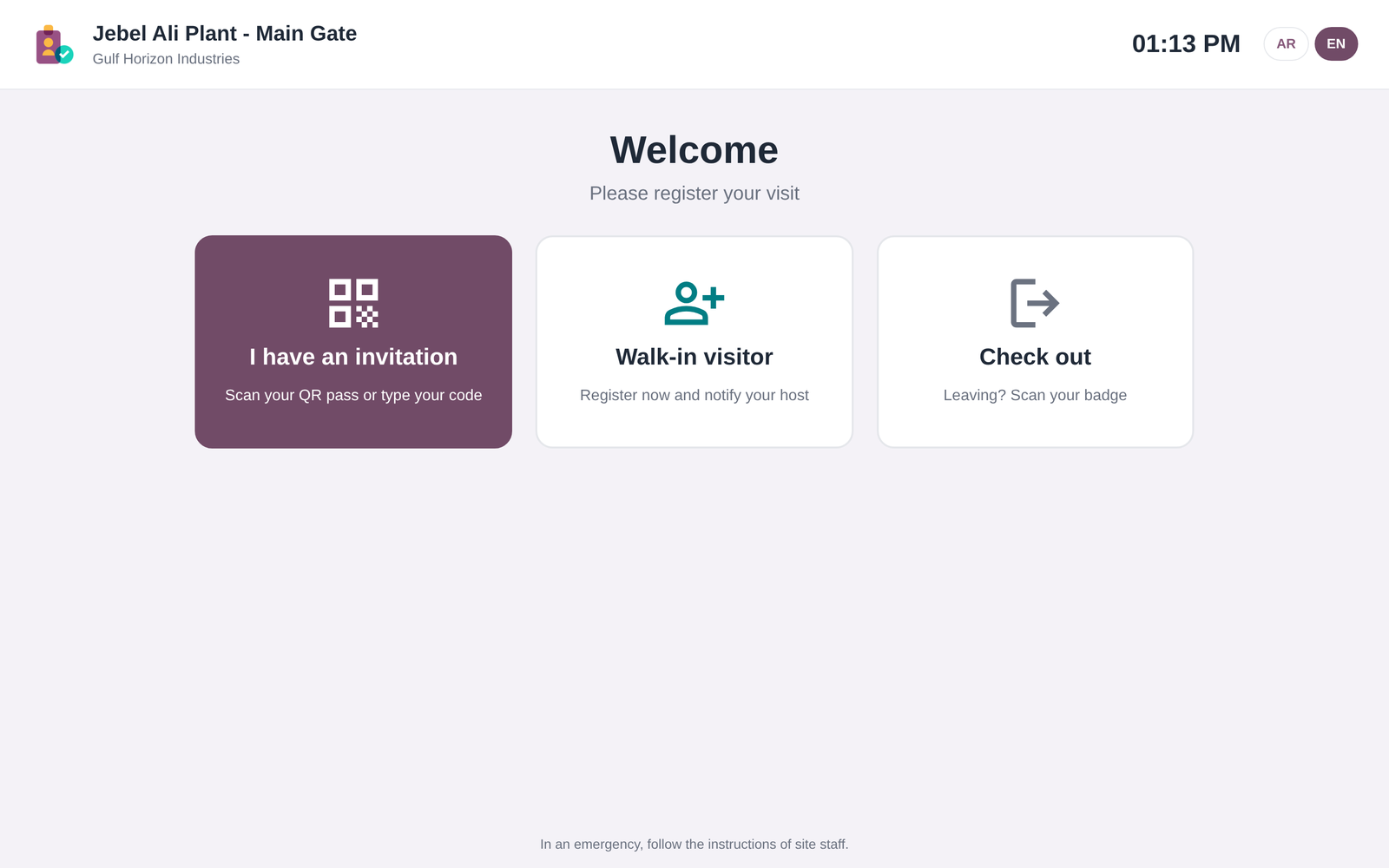
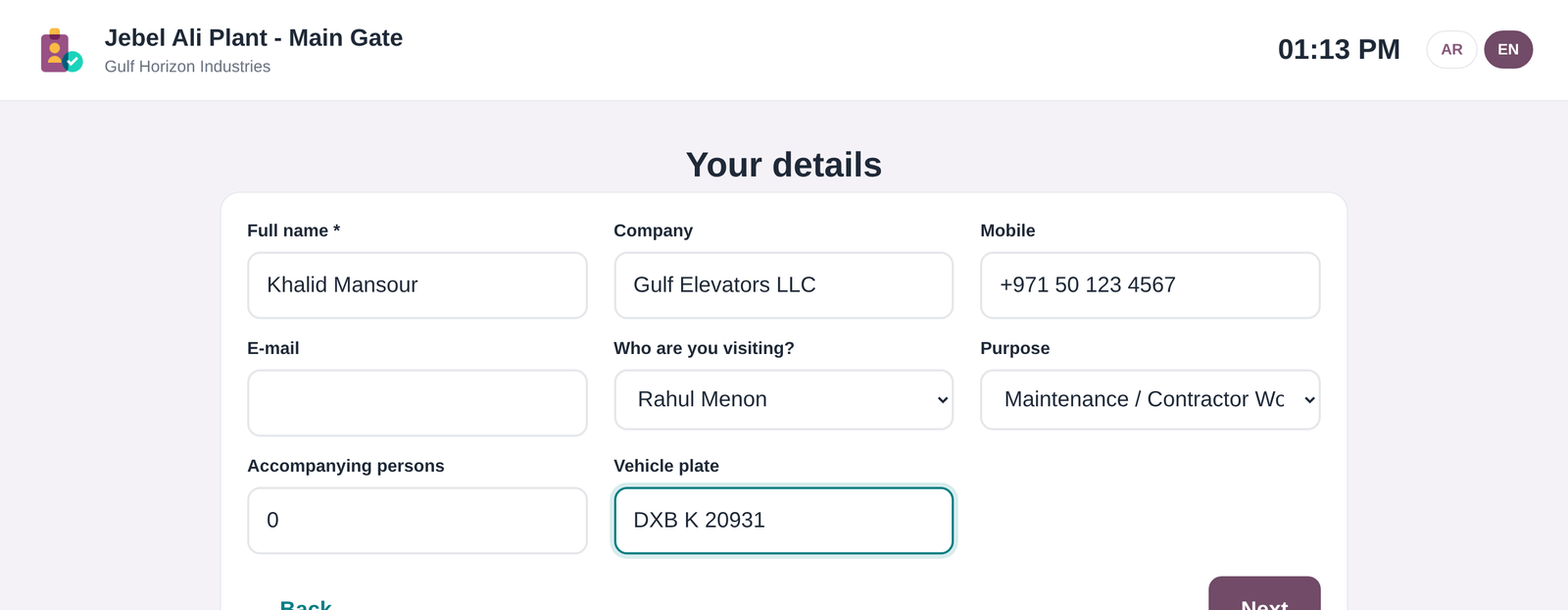
Walk-in registration with host and purpose
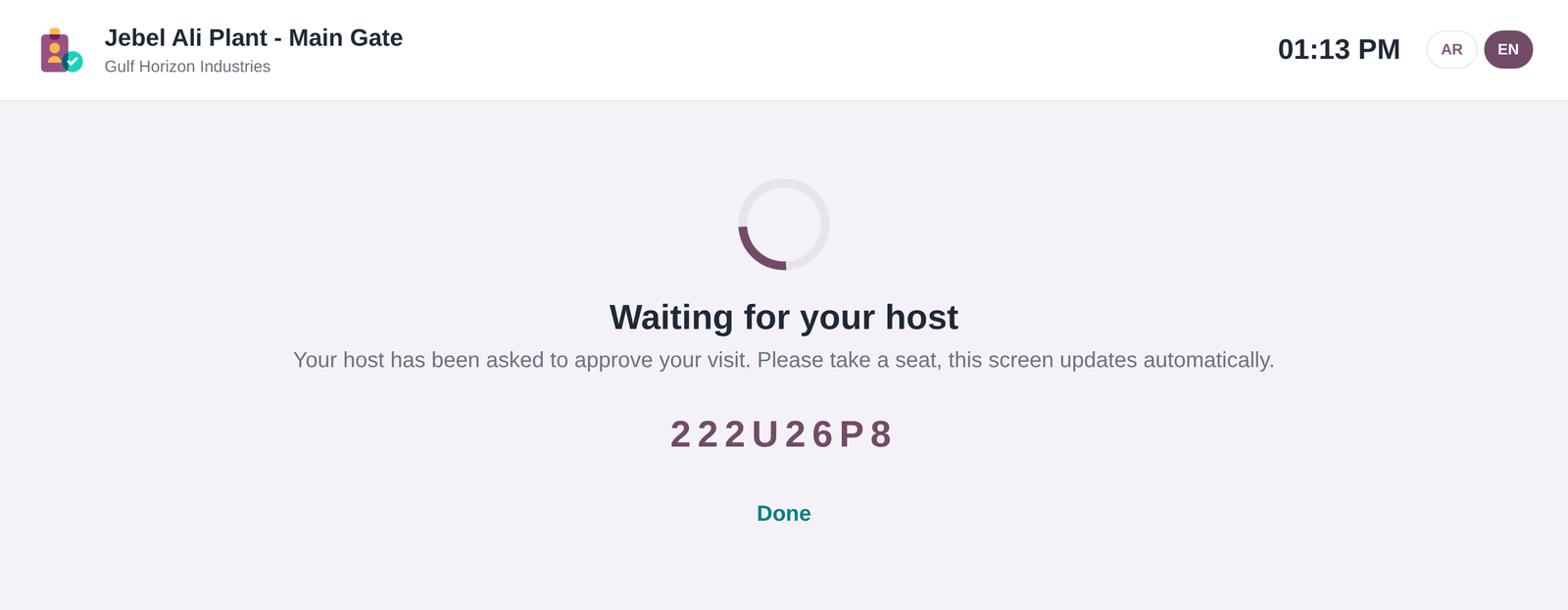
Waiting for the host. Check-in happens automatically on approval
3. Compliance before entry: induction, PPE and signature
The kiosk only asks for what the site requires: photo, ID, safety induction, protective equipment and the NDA / site rules, signed on screen.
4. Arabic and right-to-left, out of the box
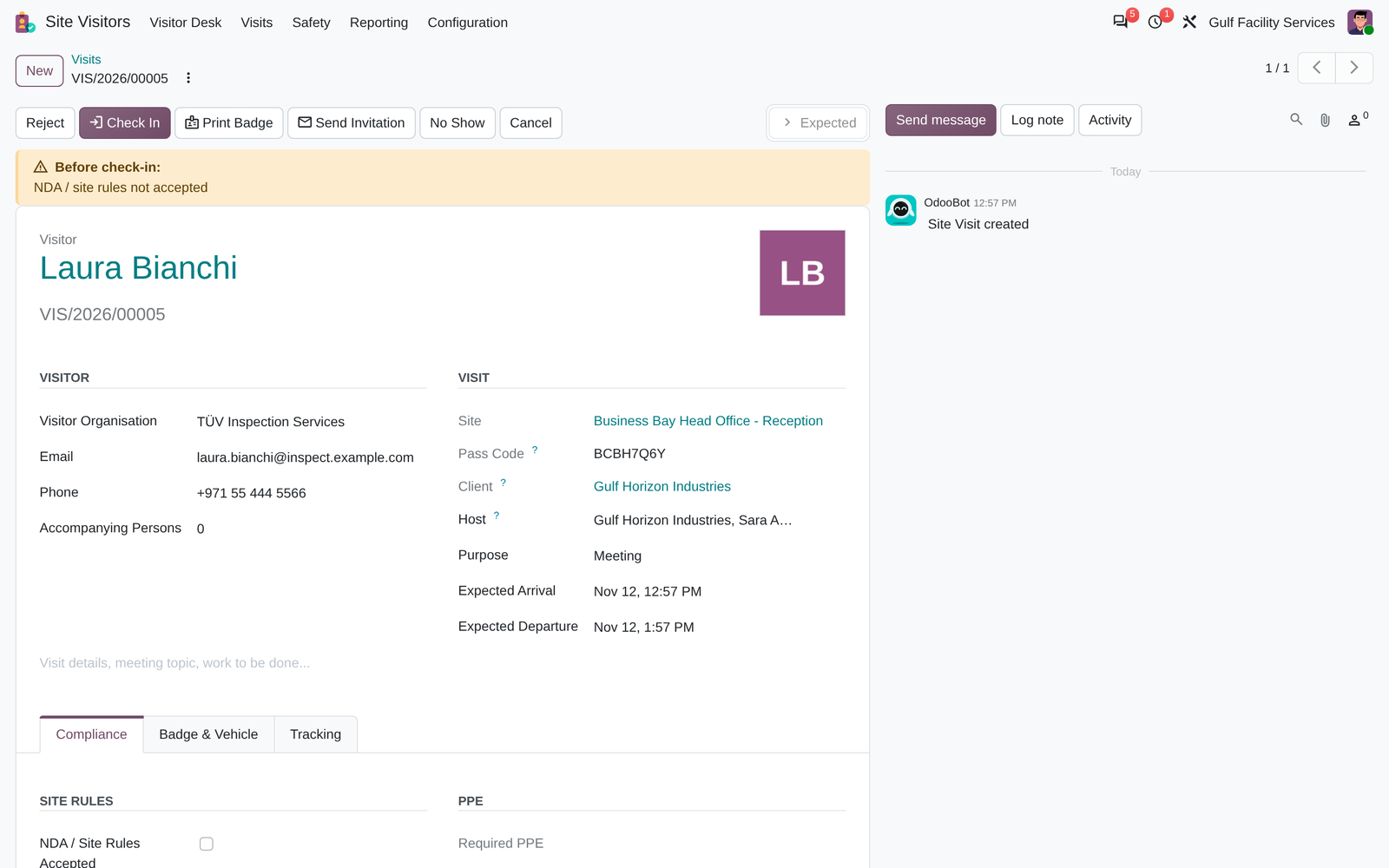
5. The visit record, with a compliance checklist
The guard sees exactly what is missing before check-in. One click checks the visitor in, prints the badge or re-sends the invitation. Every step is tracked in the chatter.
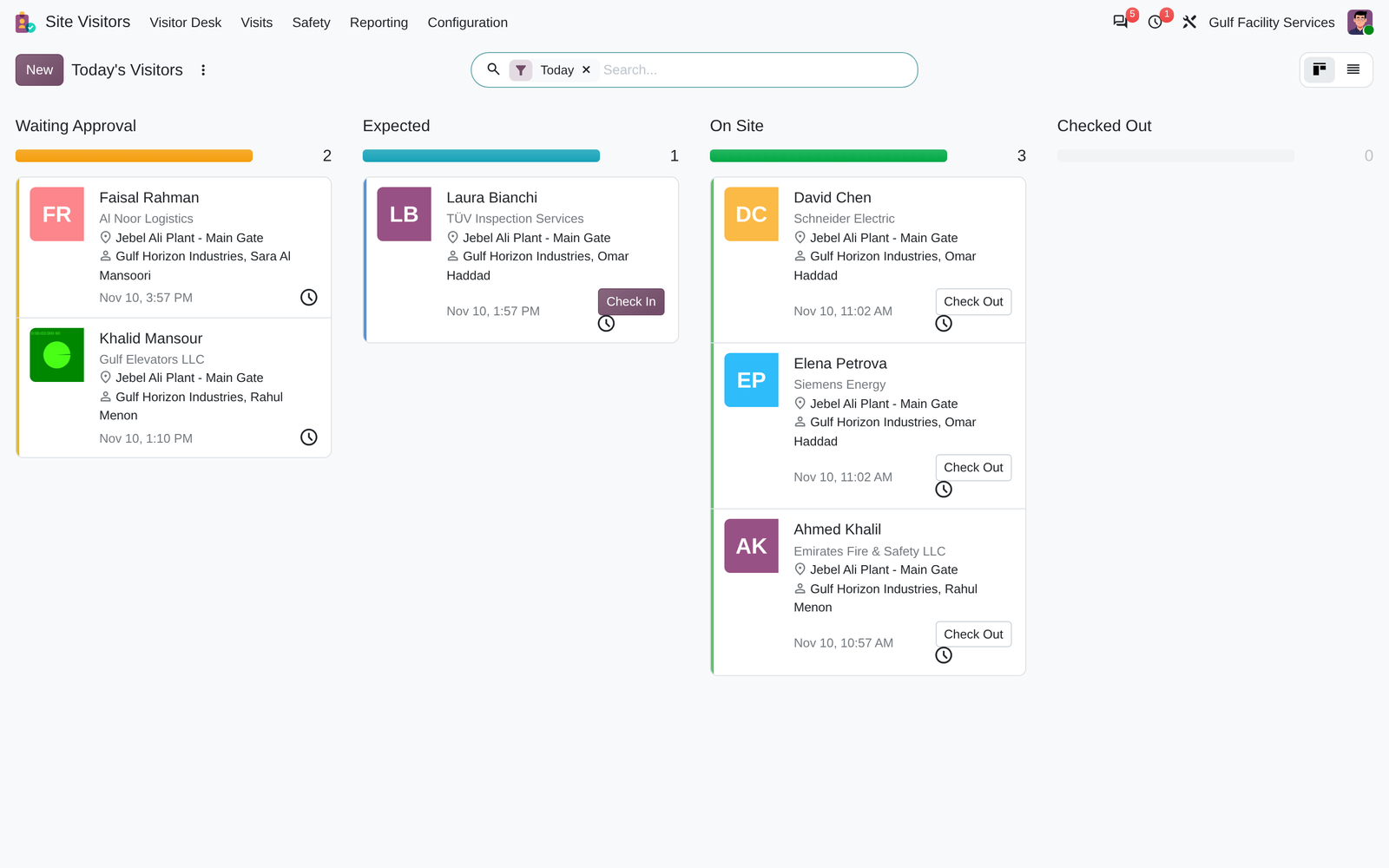
Today’s visitors by status, with check-in and check-out buttons
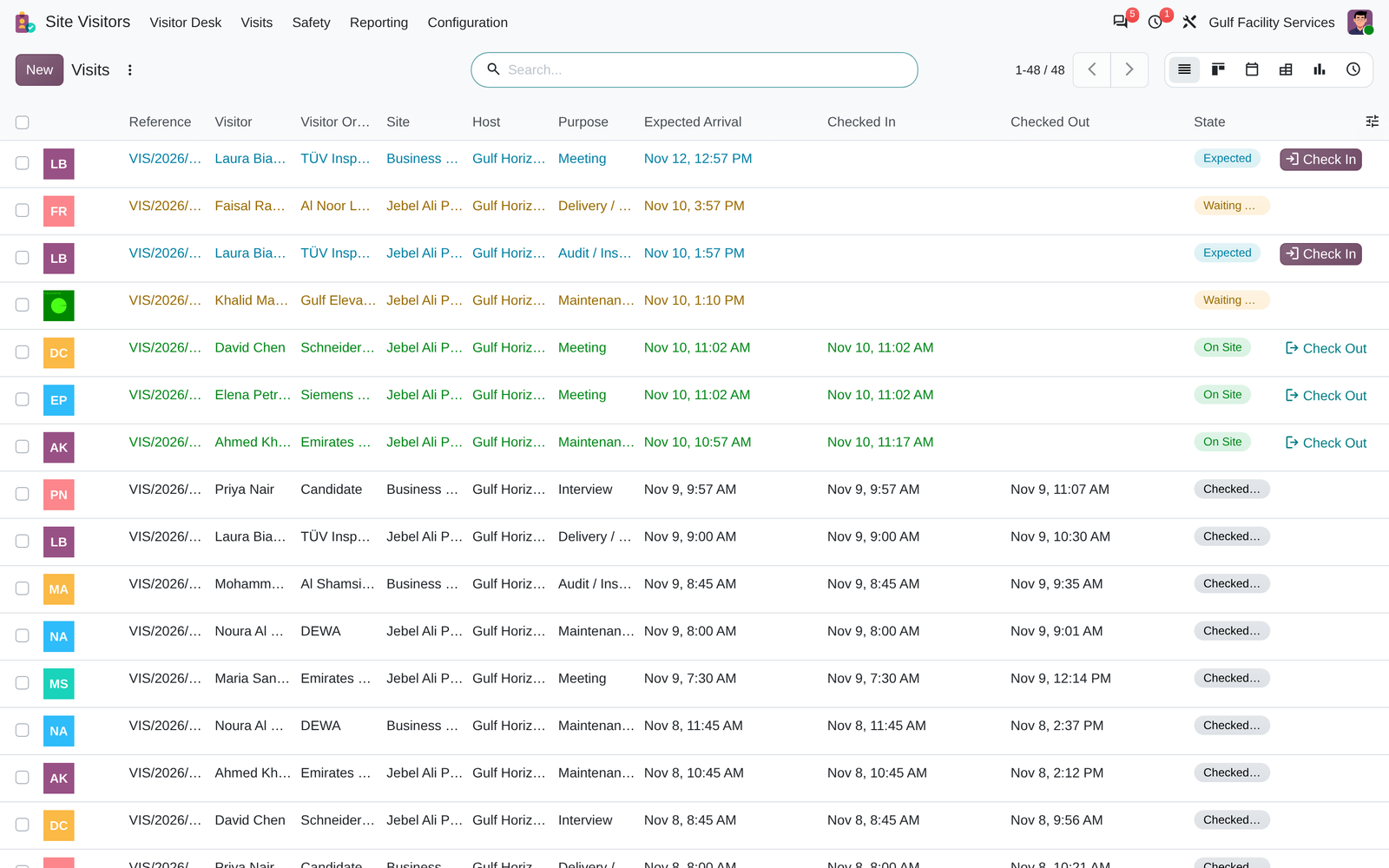
Visit log with filters: overstay, badge not returned, not accounted for
6. Configure each client site
Set hosts and approvers, approval rules, time limits, identity and safety requirements, the NDA text, the induction, PPE, the kiosk and the badge colour, separately for every site.

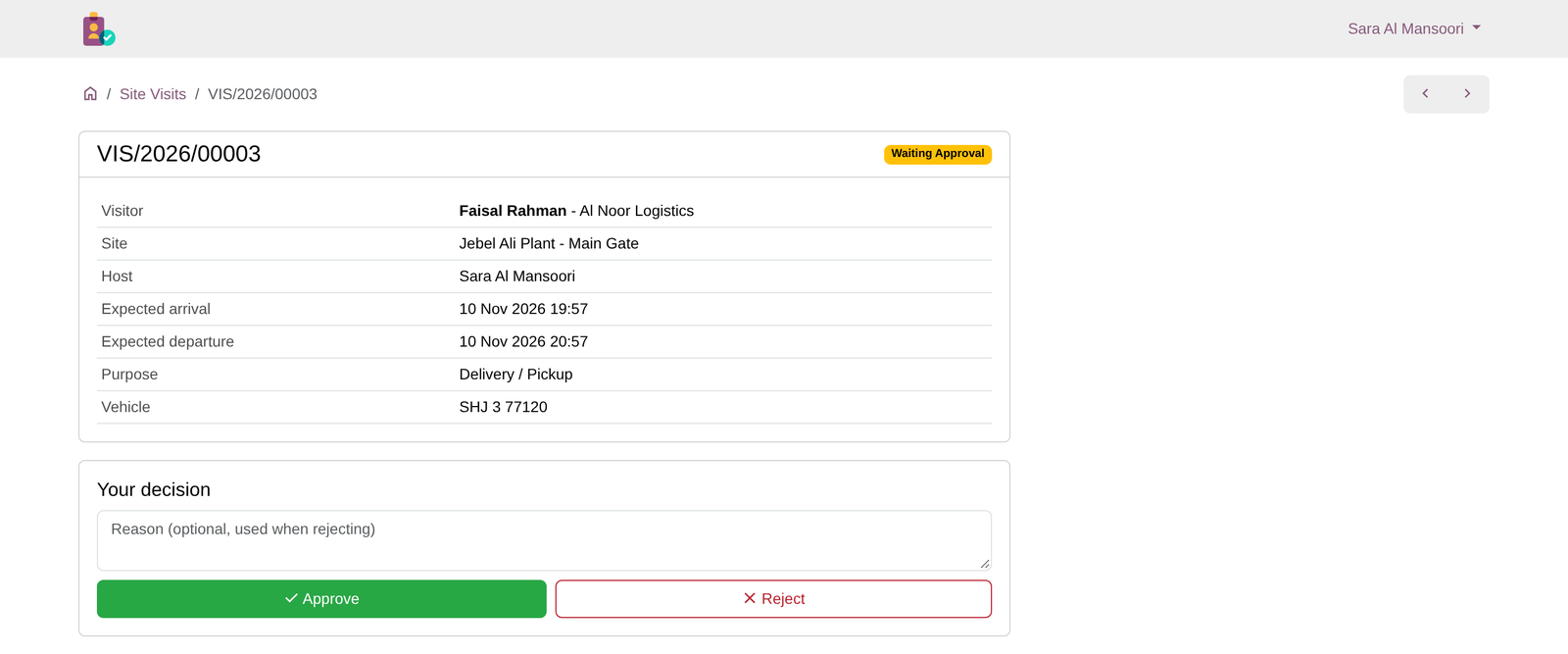
7. QR pass and one-click approval

The visitor’s online pass, with a pre-arrival form to sign
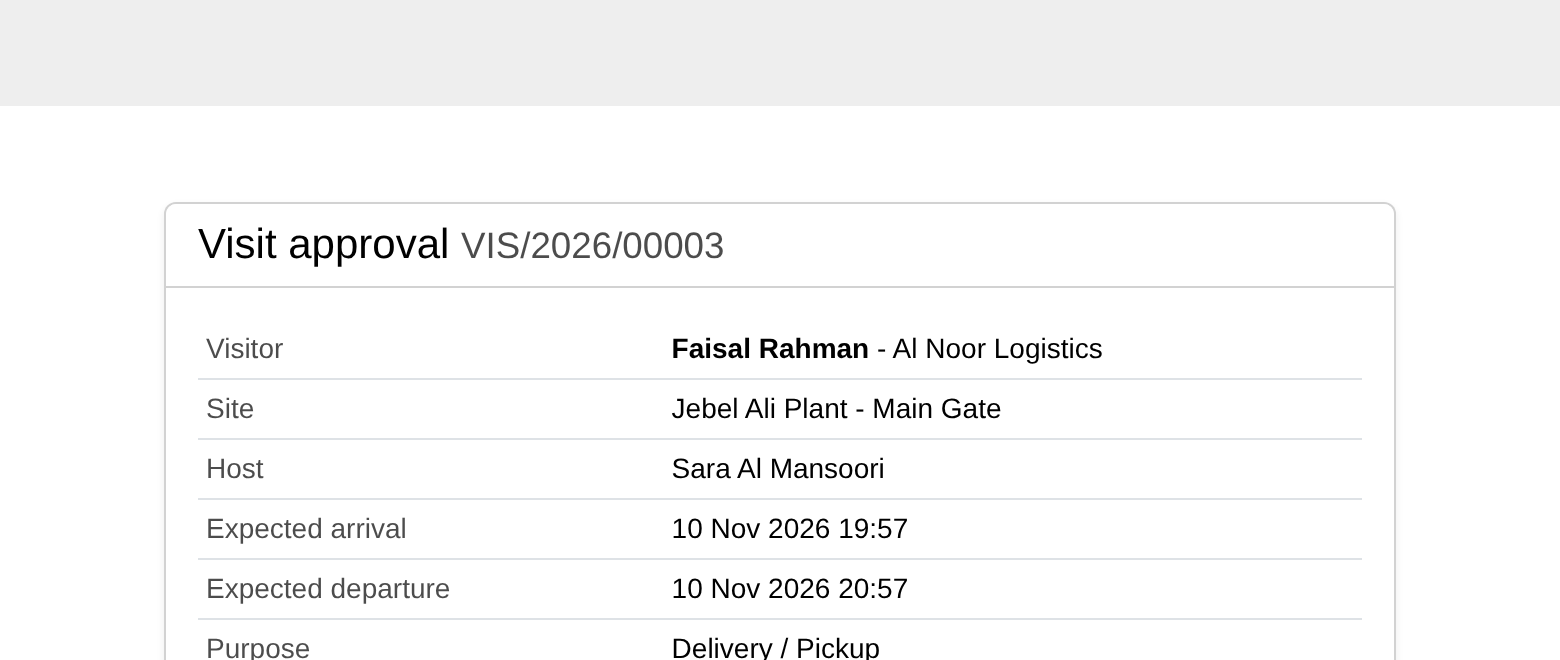
The host approves from the e-mail link, with no login needed

Card-size visitor badge (CR80) with QR code
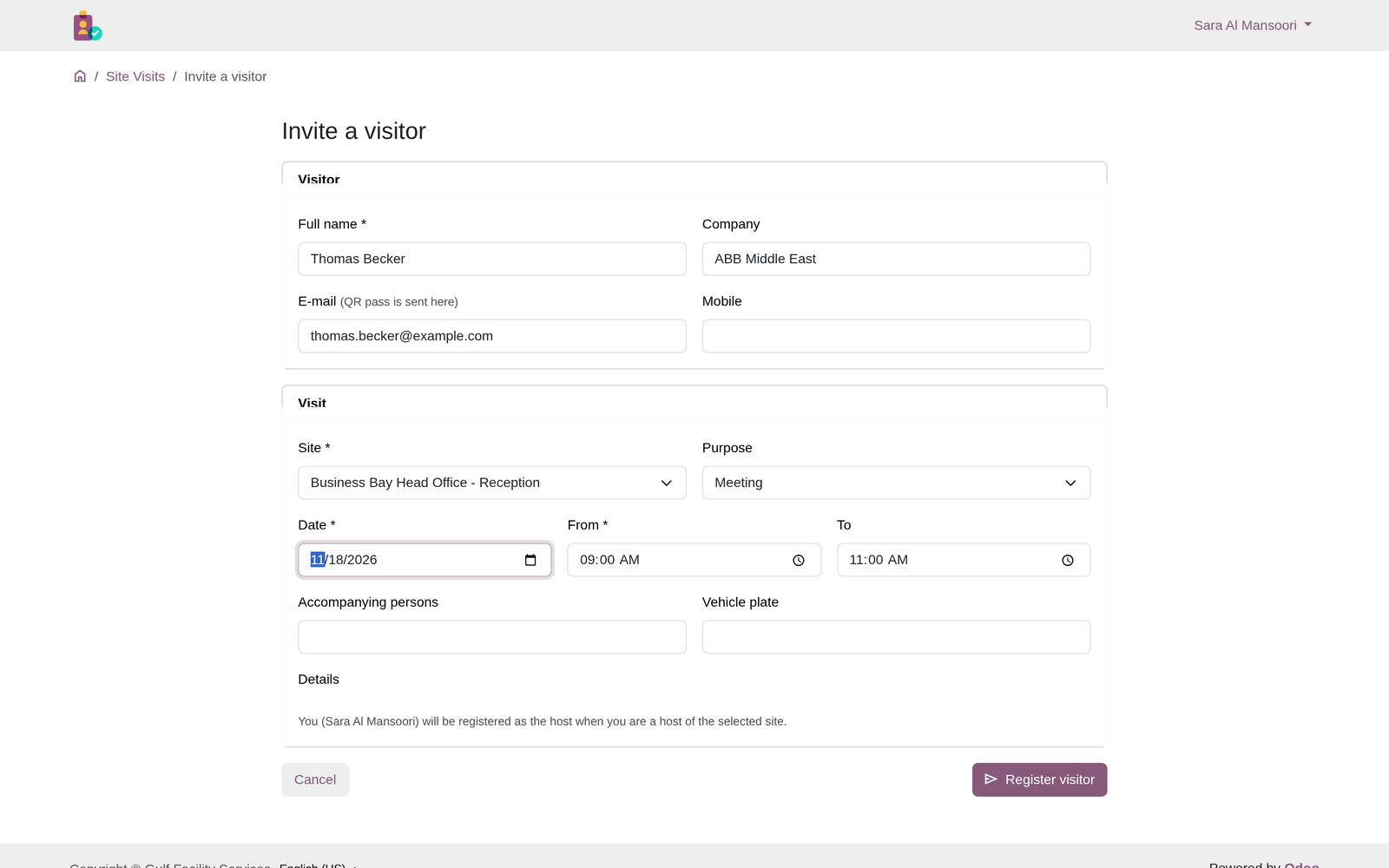
8. Client portal for hosts
Client contacts with portal access invite their own visitors, follow visits to their sites and approve requests. They only ever see their own company’s sites.


9. Evacuation roll call
During an evacuation, open the roll call and tick each visitor as they reach the assembly point. The card shows how many are accounted for, and the muster list can be printed.


10. Watchlist and analysis


How a visit flows
1. Invite
2. Approve
3. QR pass
4. Comply
5. Check in
6. Check out
Security & access
- Officer (Security / Reception) sees only the sites they’re assigned to
- Administrator configures sites, kiosks and the watchlist and sees everything
- Multi-company record rules on sites, visits, visitors and the watchlist
- Portal users see only the sites of their own company
- A secret, regenerable URL per kiosk. Visitors see only their own visit details
- Separate tokens for approval links and for visitor passes
Technical
- Depends only on standard modules:
mail,contacts,portal - Does not depend on, or conflict with, Odoo Enterprise Frontdesk
- No external Python library or third-party service
- Badge and roll call reports are standard QWeb PDF reports
- Covered by automated tests: workflow, security, kiosk, portal and reports
- Full Arabic translation included
Frequently asked questions
Does it need Odoo Enterprise?
No. It works on Community and Enterprise, on Odoo.sh and on-premise. Like any custom module, it can’t be installed on Odoo Online (SaaS).
Does it replace the Frontdesk app?
It’s independent of Frontdesk and adds multi-client sites, portal approval, compliance (NDA, induction, PPE), a watchlist and evacuation roll call. Both apps can be installed together.
Which hardware does the kiosk need?
Any tablet or PC with a modern browser. Taking photos and scanning QR codes with the camera need HTTPS. Camera QR scanning uses the browser’s barcode detector (Chrome/Edge on Android, ChromeOS and macOS). On other devices, plug in any USB or Bluetooth QR scanner.
What if the tablet has no camera?
The kiosk still works. Visitors type their code, and reception adds the photo from the back office if the site requires one.
Can hosts approve without an Odoo account?
Yes. The approval e-mail contains personal Approve and Reject buttons. Hosts with portal access can also decide from /my/visits.
Is my data sent anywhere?
No. QR codes and badges are generated by your own Odoo server. No third-party service is used.
Support & services
Questions, bug reports or need a customisation, an integration with access control hardware, or help with deployment?
info@appsgate.ae
www.appsgate.ae
APPSGATE Information Technology LLC, Dubai, United Arab Emirates. Odoo implementation partner.



Reviews
There are no reviews yet.